

What is server-side tracking and how does it work?
Server-side tracking is one of those terms you may have come across many times without ever fully understanding what it actually means. That is not surprising, as the way it works is often explained incorrectly. So it is time for Victor, Product Manager and Developer at Super Interactive, to take a closer look.
In this article, we explain step by step how server-side tracking works, why organisations use it, and what its main advantages and disadvantages are.

What is server-side tracking?
To understand server-side tracking, it helps to first understand the difference between client-side and server-side. Client-side refers to what happens in the visitor’s browser. Server-side means that processing takes place on a server where, for example, a website, script or application is hosted.
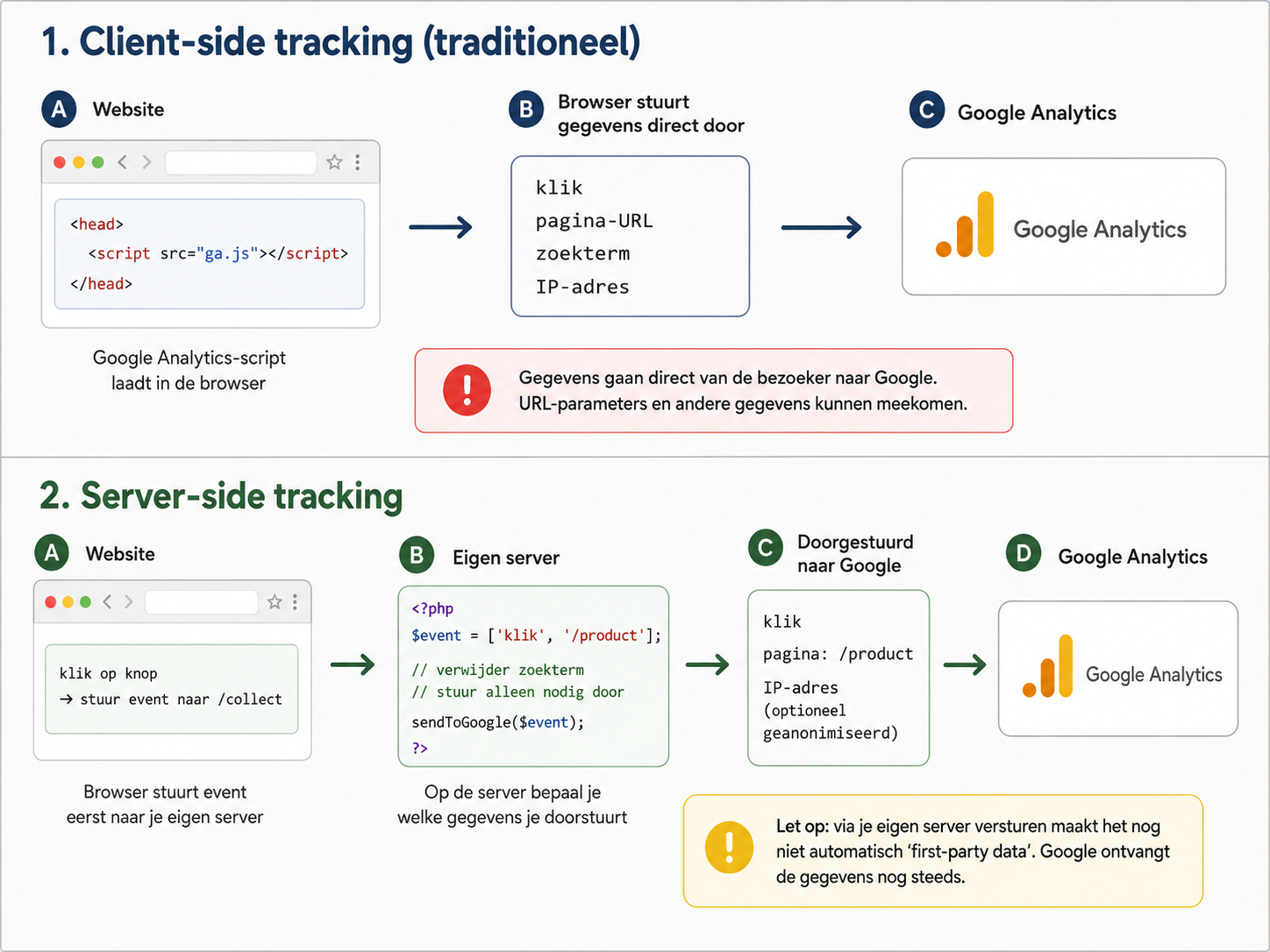
Traditionally, tracking scripts are loaded in the browser. Such a script can then connect directly to the server of a service such as Google Analytics or Meta to send data.
With server-side tracking, there is an extra step in between. Code still runs in the browser, but it first sends the measurement data to a server environment that you manage. That server processes the data and can then forward it to services such as Google or Meta.
The advantage is that you gain control over the data before it is sent elsewhere. You can, for example, remove or modify information before forwarding it to an external party. The browser also no longer needs to connect directly to the external tracking provider for every measurement.
However, this does not automatically mean that the data stays within your own organisation. If your server subsequently forwards it to Google or Meta, the data still ends up with those parties.
How does server-side tracking work technically?
A measurement from the browser, such as a pageview or click, is sent to your own tracking endpoint. From there, you can determine what happens to the data before it is potentially forwarded to other systems.
You can, for example, check, modify or filter the data. This makes it possible to remove URL parameters containing search terms and only send the page name and event to Google Analytics. The same data can also be used for other systems, such as Meta, LinkedIn or your own database.
A commonly used solution for this is server-side Google Tag Manager. The server container receives the measurements, processes them according to the configured rules and determines which data is ultimately forwarded to which parties.
What are the advantages of server-side tracking?
The main advantage of server-side tracking is that it gives you more control over which data you collect and forward. You decide which information you remove, modify, store or send to parties such as Google or Meta. There are several other advantages as well:
Performance: because fewer third-party scripts need to be loaded in the browser, the website can become faster and the browser has less work to do.
Security: less external code in the browser means you have more control over what is being executed on your website.
Less dependency: you are less dependent on how Google, Meta or other parties have implemented their scripts and browser-based tracking. You decide how data is received, processed and potentially forwarded.
What are the disadvantages of server-side tracking?
Server-side tracking gives you more control, but it also makes the technical setup more complex. You have to deal with servers, data flows and tag management, which means the implementation requires more technical knowledge than traditional client-side tracking.
Setting everything up and testing it usually takes more time as well. You are not only checking whether events are being received correctly, but also what happens to the data along the way and where it ultimately ends up. That also means more ongoing maintenance after implementation.
There may also be additional costs for hosting, tooling or management. More importantly, you take on greater responsibility for the data you process. You therefore need to carefully determine what you collect and what you send to external parties. Server-side tracking does not automatically make an implementation GDPR-compliant.
Need help with server-side tracking?
Wondering whether server-side tracking is right for your organisation? Book an introductory call and we’ll look at which data you actually need and how to collect it in a controlled, privacy-friendly way.

Victor
Developer